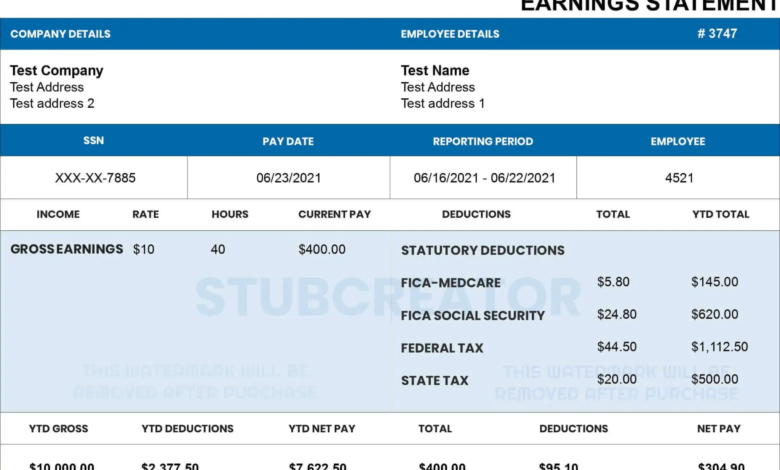
Using a free pay stub template can make payroll documentation much easier, especially for small businesses, freelancers, and employers who want a more organized payment process. But while templates are convenient, they only work well when they’re used correctly.
A lot of people assume downloading a template is enough. In reality, the quality of the final pay stub depends on how accurately and consistently the template is filled out. Small mistakes can create confusion, lead to record-keeping problems, or make the document less useful for the employee.
To get the most value from your template, here are seven common mistakes to avoid.
1. Leaving Out Important Payroll Details
One of the most common issues is using a pay stub template that looks complete at first glance but is missing key information.
A proper pay stub should clearly show:
- Employee name
- Employer name
- Pay period
- Gross pay
- Deductions
- Taxes
- Net pay
If any of these are missing, the document may not provide a full picture of the payment. This can become a problem later when the employee needs a clear payroll record for personal or administrative use.
2. Using the Same Template Without Updating It Properly
Templates are meant to be reused — but they still need to be updated carefully each time.
A surprisingly common mistake is forgetting to change details such as:
- Pay period dates
- Hours worked
- Earnings
- Tax or deduction amounts
- Payment date
Even one outdated section can make the pay stub inaccurate or confusing. Before finalizing any payroll document, it’s worth reviewing every field to make sure the current payment details are correct.
3. Choosing a Template That Doesn’t Match Your Payroll Style
Not all businesses pay employees the same way, which means not every pay stub template will be a good fit.
For example:
- Hourly employees may need overtime and hours-tracking sections
- Salaried workers may need fixed earnings fields
- Contractors may need a simpler payment layout
- Businesses with commissions may need custom earning categories
Trying to force every payment style into a generic template often creates messy records. It’s much better to use a format that reflects how your payroll actually works.
4. Overcomplicating the Design
A pay stub does not need to be visually impressive. It needs to be clear.
Some people choose templates with too many design elements, extra formatting sections, or unnecessary visual clutter. While these may look appealing at first, they often make the actual payroll information harder to read.
The best templates are usually the simplest ones — clean, organized, and easy to understand at a glance.
When it comes to payroll records, usability always matters more than decoration.
5. Ignoring Consistency Across Pay Cycles
Another common mistake is changing formats too often.
If one pay period uses one layout and the next uses a completely different one, payroll records become harder to compare and manage. This can create unnecessary confusion for both employers and employees.
Using a consistent template over time helps:
- Improve record keeping
- Reduce payroll errors
- Make documents easier to review later
- Keep internal payroll processes more organized
A consistent structure is one of the biggest advantages of using templates in the first place.
6. Not Checking Totals Before Finalizing
Even if you’re using a ready-made template, it’s still important to review the numbers before saving or sharing the document.
Errors in:
- Gross pay
- Deductions
- Tax calculations
- Net pay
can quickly reduce the usefulness of the pay stub.
Templates help organize payroll information, but they do not automatically guarantee accuracy unless the information entered is correct. A quick review before finalizing can prevent avoidable mistakes.
7. Treating the Template Like a One-Time File
A good free paystub template should be treated as part of your payroll workflow, not just a one-off document.
When people download a template and use it casually without setting up a repeatable system, payroll records often become scattered and inconsistent. A better approach is to treat the template as a reusable business tool.
That means:
- Saving a clean master version
- Updating it carefully each pay cycle
- Keeping completed records organized
- Using the same structure regularly
This simple habit can make payroll documentation much easier over time.
A Better Way to Use Templates
The best pay stub templates are the ones that are easy to understand, practical to reuse, and flexible enough to match your payroll style.
If you’re looking for a cleaner and more user-friendly option, starting with a well-structured format can save time and reduce errors. StubCreator offers a secure paystub creator that allows users to generate paystubs instantly with clear payment breakdowns.
Final Thoughts
A pay stub template can be a valuable payroll tool — but only if it’s used thoughtfully. By avoiding these common mistakes, businesses and independent professionals can create more accurate, more professional, and more useful payroll records.
In most cases, small improvements in documentation lead to much smoother payroll processes overall.
Also Read:
How Many Working Days In 2026
Hobby Lobby Employee Portal Login
How Long Is a Business DayFIT Taxable Wages Explained